Skip to content

Get started with AI on your real work.

For you, or your whole team. I set AI up in the apps you already pay for, without breaking anything you rely on, and a person approves what goes out.

For owners and small teams who run the business on email, spreadsheets and phone calls.

Two ways to start

For you

Your own AI assistant, set up around how you work.

I’ll get you started with AI, for yourself and at work. I set up your assistant with the context it needs about you, the guardrails it should follow, and a few skills for the work you do most.

How it runs

  1. Book a free call
  2. A 2-hour setup together ($500, credited toward a team plan)
  3. Your assistant runs on your real work

What you leave with

  • The basics, so it stops feeling fragile
  • AI for the repetitive work, for raising the quality bar, and for research
  • A clear sense of when to leave it out

For your team

Get your team started with agents.

I start with a walkthrough of how your team works today: your workflows, the problems worth solving, and the apps you already use. Then we build your AI playbook together, so the repeat work moves to agents and the work that really matters is approved before it’s shared.

How it runs

  1. Learn how your team works today, in your apps
  2. Map the workflows worth moving to agents
  3. Build your AI playbook together, tested on real work
  4. Hand over to an owner on your side

What your team keeps

Your AI playbook: your workflows, the agents that run them, the quality bar AI has to clear, and who approves the work before it’s shared. Written so your team can run it without me.

Humans belong in the loop.

Every task gets one of three answers.

Before anything runs, we go through your team’s work together and agree who does each task and who signs off. You see the answer for every task, and you can change it.

AI handles it

Repeat work with a clear right answer. It runs on its own and keeps a log you can check.

AI drafts, you approve

Anything a customer or client will read. AI writes it, a person approves it, and it goes out under their name.

People decide

Prices, promises and people decisions. AI can lay out the numbers. A person makes the call.

Your sign-off sheetAn example from a small print shop
TaskWho does itWho signs off
Sort the shared inboxBilling, support and sales, every morning
AI handles it
No sign-offYou can check the log
Match payments to invoices38 matched, 3 flagged that don’t line up
AI drafts, you approve
BookkeeperChecked the 3 flags
Reply to quote requests40 mugs, two-color print, $412
AI drafts, you approve
Sales leadApproved, sent under their name
Weekly client updateStatus, dates and next steps
AI drafts, you approve
Account managerApproved
15% off for a repeat customerMargin drops from 31% to 22%
People decide
OwnerAI did the math

About three weeks, in set working sessions.

It starts with a free call. Then four steps on your real work, one team at a time.

  1. 1Week 1

    Walk through

    A 60-minute walkthrough with your team. Then I read how the work runs: a week of inbox samples, your docs and your CRM, with access scoped to the task.

  2. 2Week 1 to 2

    Build

    The first assistant, on your real data, with written rules for what needs a yes.

  3. 3Week 2 to 3

    Test

    I test it on past work against a bar your team sets. It goes live when it clears.

  4. 4Week 3

    Hand off

    Your AI playbook, training, and an owner on your side. Then I step back.

Your AI playbook

Every workflow gets one page like this, in four parts: the problem, the context the agent needs, its guardrails, and the check a person makes before anything is shared. Your team can change any line without me.

One page per workflowYour AI playbookCustomized to your team
Problem
Pick one task that repeats or wastes time.
Context
Give the agent what it needs to know about your business.
Guardrails
What it can and can’t do, and what needs a person.
Check
A person approves before it’s shared.

Start free. Grow when it’s working.

Each step stands on its own, so you only go as far as it keeps paying off.

For you

Office hoursFree30 minutes

One question about AI or product, and a straight answer.

Your assistant, 1:1$5002 hours, credited toward a Plan session

Your own AI assistant, set up around your work, your tools and your limits.

Executive setup$2,000Two 2-hour sessions, plus 30 days of follow-up

Your assistant on your own email and calendar, private by default, with a month of questions answered as you use it.

For your team

Plan session$7502 hours, up to 8 people

You leave with a written plan: the first 3 tasks for AI, and what stays with people.

Start here
First playbook$2,500One workflow, your $750 plan session is credited

One real workflow mapped, the agent set up in your apps, tested, and written into your playbook.

Team rolloutfrom $6,000Up to 10 people, about 3 weeks, one team at a time

Your playbook extended across the team’s core work, tested and handed over.

Whole company, 25 to 50 people: from $15,000, rolled out one team at a time.

Keep it running$1,500A month, month to month

Questions answered within 2 business days, fixes as your apps change, and new pages added to your playbook.

No software to buy. I set you up on the tools you already pay for. Your $500 setup is credited toward a Plan session, and the Plan session is credited toward your First playbook.Book a free call (opens in a new tab)

Questions people ask.

Not here? Ask on the free call.

We’re a small, traditional business. Is this for us?

Yes. Some of the best wins are in businesses that run on email, spreadsheets and phone calls. I start with one task you already do every week.

I’m not technical. Can I still do this?

Yes. I set AI up in the apps you already pay for, so there’s no new software to buy. We do the setup together in a working session, and you leave with the basics, so it stops feeling fragile. Your playbook is written so your team can run it without me.

How much of my time does this take?

It runs in set sessions, so you know up front. On your own: one 2-hour setup, or two 2-hour sessions for the Executive setup. For a team: a 2-hour Plan session, then about three weeks of set working sessions, starting with a 60-minute walkthrough. Once it’s running, your part is approving what AI drafts before it goes out. Repeat work with a clear right answer runs on its own, with a log you can check any time.

Will this replace people on my team?

That’s not what I set up. People keep the judgment calls and get time back from the repeat work. Every task has an owner on your side.

Do you need access to our systems?

For a team rollout, yes, scoped to the task, and I’m happy to sign your NDA. I work inside your own accounts, so your data stays in your tools and you own everything I build. On business plans of Claude and ChatGPT, your data isn’t used to train their models by default.

Which AI do you use?

Whatever fits your team and your company’s rules. Mostly Claude, and ChatGPT when that’s what you have.

Do you sell a tool?

No. No software, no referral fees. I set you up on the tools you already pay for, or the simplest one that fits.
Built in, then handed over.

Client work that runs without me, and AI projects I’ve shipped.

Triplified content engine: from ticket to reviewed draftSix steps from a Linear ticket to a shipped draft, person steps in blue, Claude steps in teal, the review sign-off in green; the quality gate built into the engine; its guardrails; and the four skills. Triplified Content engine From ticket to reviewed draft Claude plugin, four skills Ticket Person A Linear ticket: topic, type, keyword, stage. Ask Person Tell Claude what to write, in your own words. Skills load Claude Engine, types, claims and voice load on their own. Draft Claude Brief, article, answer block, meta, self-check. Review Person Checked against the claims and the voice. Ship Person To Drive, then through the review stages in Linear. Built in Keyword in the H1, the first 100 words, an H2 and the close Title under 60 characters, meta description 150 to 160 At least one question and answer block, for AI answers Opens on the reader’s problem, closes with a next step No AI-tell vocabulary, no em dashes, varied rhythm Guardrails Case studies come only from real project data Every financial number is verified by the client’s expert Every format is checked against the claims registry Skills content engine content types claims registry brand voice Reusable for any client; the voice skill is per brand

A content engine Triplified’s team runs on its own

Triplified needed articles, FAQs and case studies for an industrial client that hold up with engineers. I built it into their workflow as a Claude plugin, then trained the team to run it.

Content engineSearch-ready drafts and a quality checklist
Brand voiceMessaging, keywords and competitors in one place
Claims registryWhat the brand can and can’t claim, written down
Content typesCase studies, application pages, FAQs
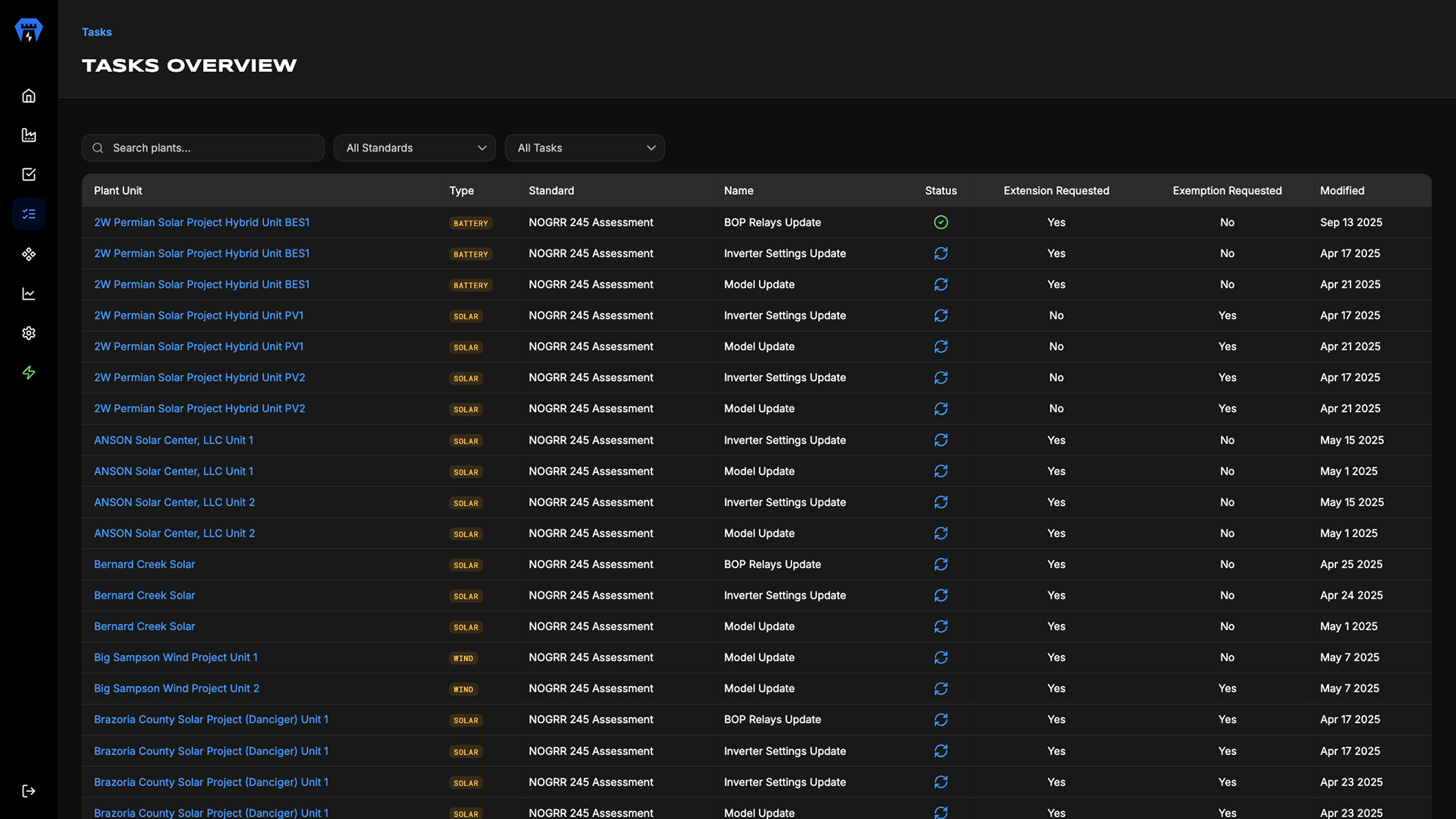
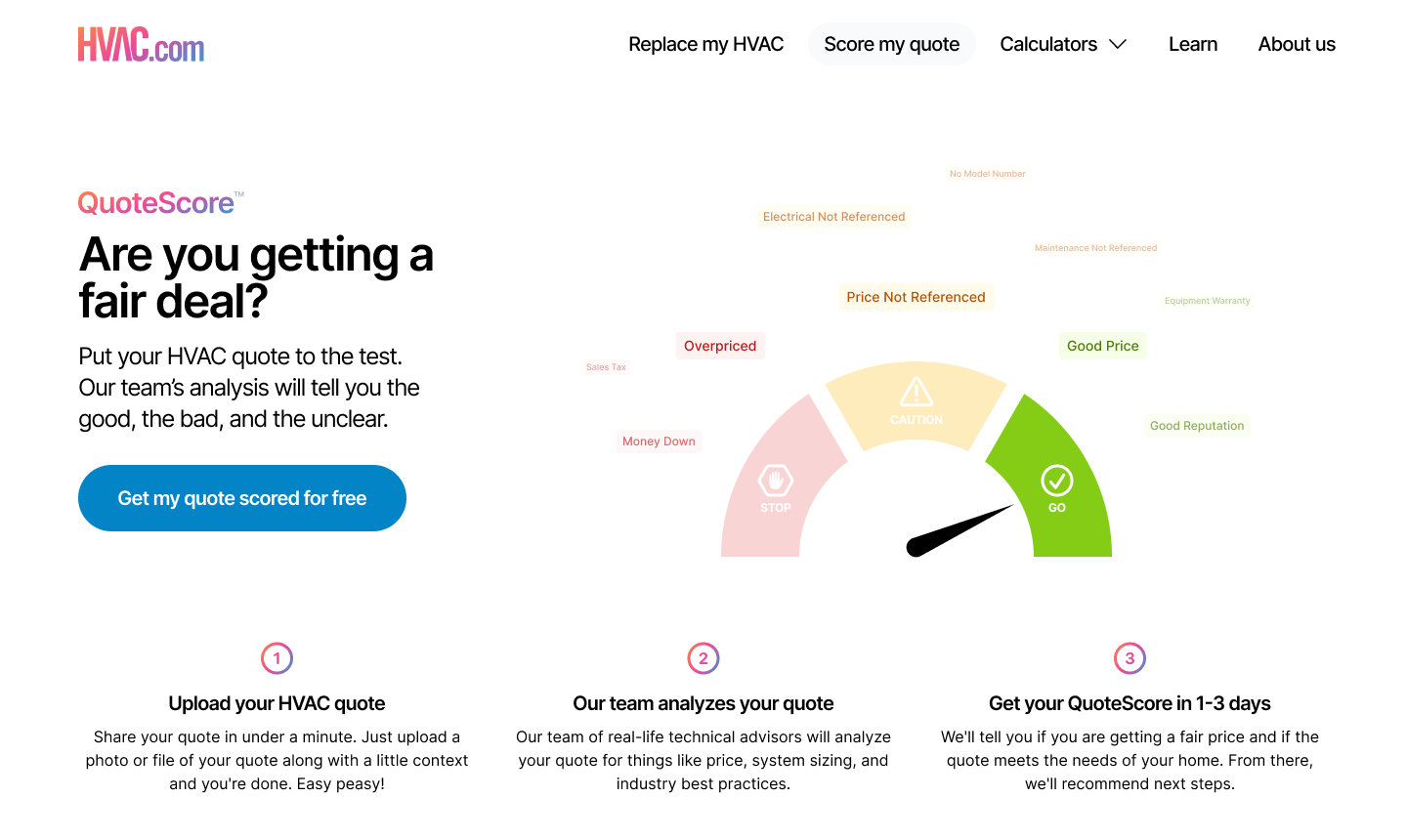
GridStrong task dashboard: compliance tasks by plant unit, standard and statusAI for power grid complianceA compliance copilot at GridStrong whose early prototypes helped win a $1.4M DOE grant.Case studies HVAC.com QuoteScore: a homeowner’s quote scored from stop to goAn assistant for homeownersAn LLM assistant at HVAC.com, next to calculators that converted at 50x the site baseline.Read the case study
Free tools to try with your teamTwo free Claude tools you can try today.Unpaid Intern: turns your team’s meetings and docs into a briefing you can actually use.Personal Site: build your own website with Claude through a guided interview, start to finish.Unpaid InternPersonal Site

“[Kevin] makes even ambiguous work feel navigable, and the people around him consistently do their best work.”

Matt Triplett, founder, Triplified
Stippled ink portrait of Kevin Middleton

You’ll work with me, start to finish.

I’m Kevin. I’ve spent 13 years in product at Oracle, Rocket Lawyer, Lever, Sendoso and HVAC.com, and built AI for power grid compliance at GridStrong.

My best work happens between teams, getting people to agree on how the work should go. AI made that matter more: the tools are easy to try and hard to trust.

Start with one task.

Middleton

Thirty free minutes. Bring the task your team does every week that nobody likes.

Book a free call (opens in a new tab)