
This week a stranger on LinkedIn posted two emails from the same company. One said "thanks for applying," the other said "we've decided to move forward with other candidates," and both were stamped 2:02 PM. His caption: "Actually, this was an AI filter, and their resume got rejected automatically." His LinkedIn headline: "Optimize Your Resume to Get Past AI Filters." His profile also had a link to his store.
I said in the comments what most likely happened (it was probably a knockout question that led to the rejection, not AI). He blocked me.
Misinformation about hiring is everywhere right now, and a lot of it is selling something. I worked at Lever, one of the applicant tracking systems (ATS) that sit behind the Apply button. So here's the behind-the-scenes intel I wish every job seeker could see: what happens to your application, step by step, from someone who helped build the software.
Step 1: Your application record is created
When you hit submit, the ATS creates a candidate record. Your resume gets parsed into fields like name, email, past titles and dates. That helps the recruiter search and sort. It doesn't grade you.
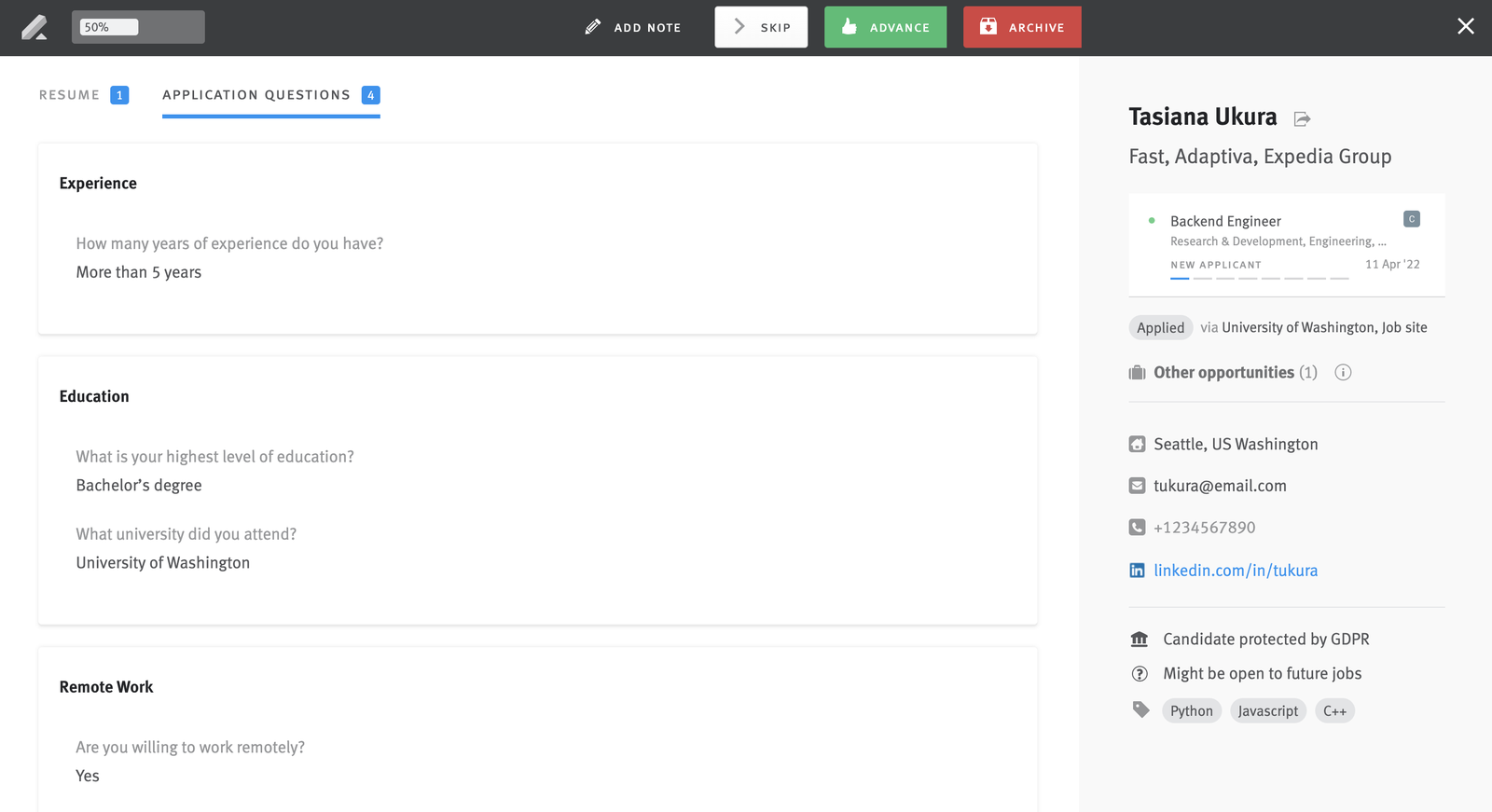
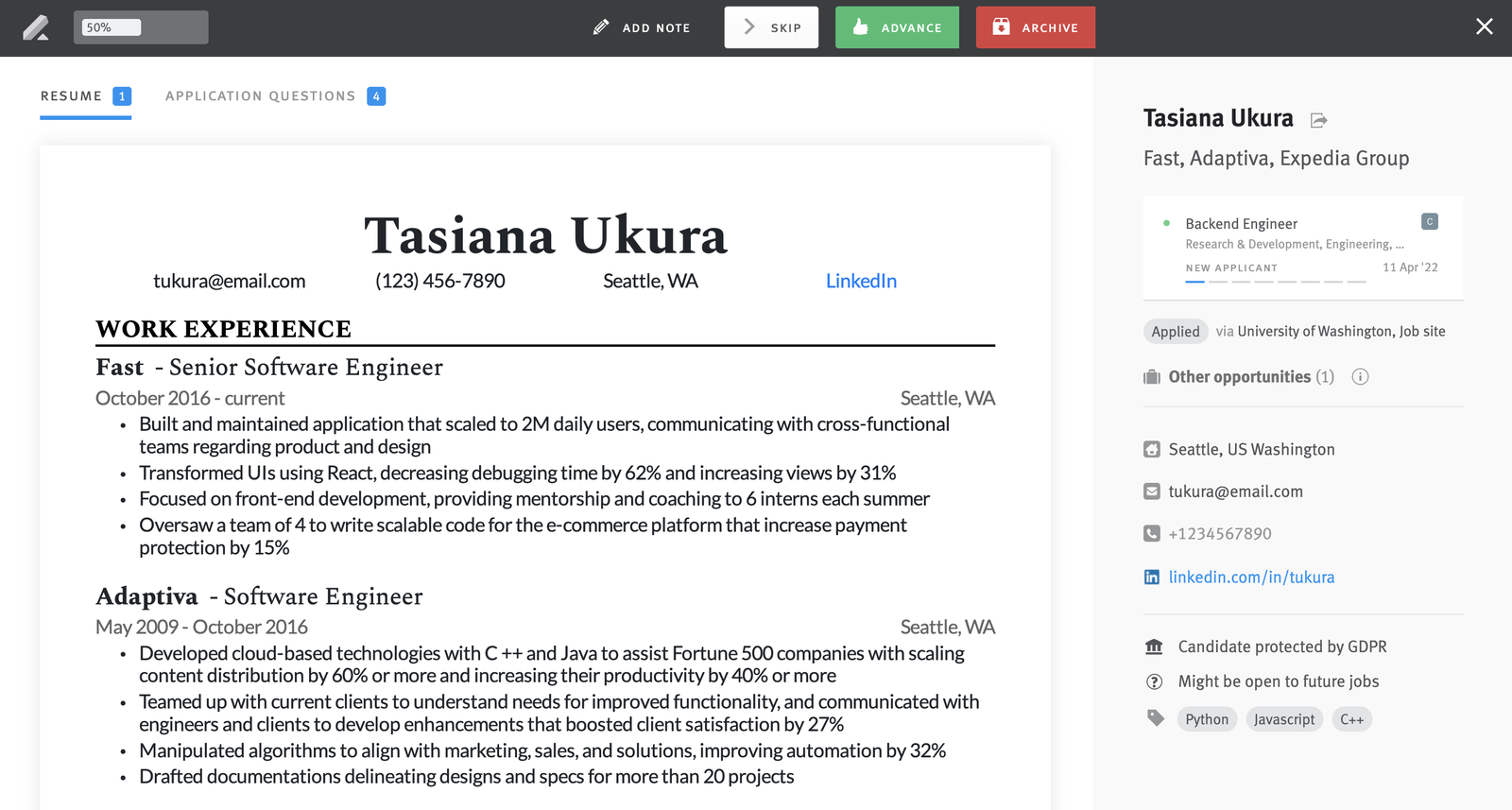
And a bad parse won't get you rejected. If a two-column layout or a fancy header comes out scrambled, that's annoying, but you won't get lost. The recruiter doesn't read the parsed version anyway. They see your actual resume, the file you uploaded, laid out exactly the way you designed it. You'll see that in the screenshot below.
An ATS is a database with a workflow on top. For most of its history it's been a digital filing cabinet, and for most companies it still is.
Step 2: Knockout questions
This is the one place where an instant rejection can really happen, and it's the one the "AI filter" and "beat the ATS" folks keep spreading misinformation about.
Applications often ask yes/no questions: "Are you authorized to work in the US?" "Can you be in our office three days a week?" "Do you have five years of experience with Salesforce?" The employer can mark an answer as a dealbreaker. Pick an answer that the employer isn't looking for, and the system sends an automated rejection, often within minutes. Lever's own guidance tells employers to "use knockout rules only for clear, job-related requirements," like work authorization or location.
That's what those same-minute rejection emails were. The employer wrote a rejection rule, the candidate's answer triggered it, and the rejection template went out. Because of the candidate's answers, nobody read that resume, human or robot.
So read those questions carefully, and answer them honestly. If a role needs you in the office and you can only work remotely, the knockout just saved you a few weeks of waiting. They wanted someone in the office, even if you were a great fit for the role.
Step 3: Recruiters swipe through the queue
Everyone who gets past the knockouts lands in the New Applicant stage for that role. In Lever, the recruiter sees every open role with a count of unreviewed applicants next to it, and clicks Start Review to open something called Fast Resume Review.
Honestly, it's Tinder for resumes. Your resume fills the screen, your answers to the application questions sit one tab over, and there are three buttons at the top: Skip, Advance, and Archive.
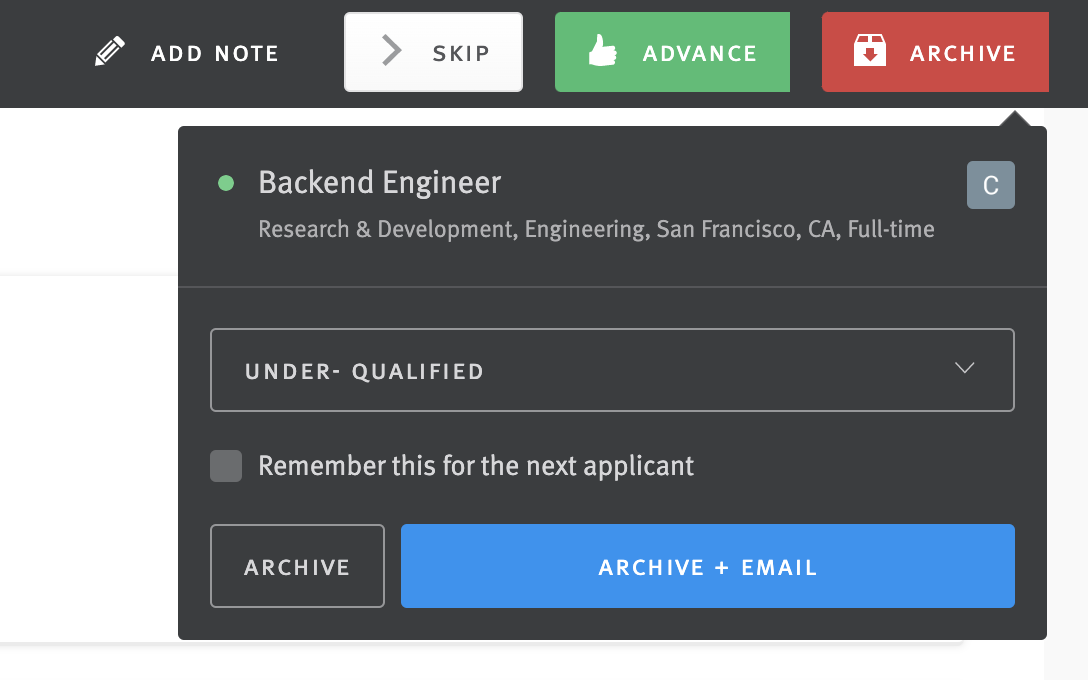
Archive is how a rejection happens. The recruiter picks a reason, like "under-qualified," and can send an email in the same click. That email comes from a template the company wrote. Some are kind ("this was a competitive process, and the decision wasn't easy"), some are short. Advance moves you to the next stage, usually with a "we'd love to talk, here's a link to schedule" template.
Two details matter for you. Fast Resume Review shows applicants oldest to newest, so applying early really does put you near the front of the line. And a real recruiter is looking at your resume!
Here's the part nobody likes to hear. Plenty of roles get more than 1,000 applicants now. Even if only 10% of them are qualified, that's 100 strong people for one job, and the recruiter is often running five other roles at the same time.
Step 4: Searches and filters
Most ATS platforms let a recruiter search candidates by keyword, title, or location. People hear "keyword search" and imagine a secret filter deleting their resume. It works more like searching your own inbox: a recruiter types "Salesforce" because the hiring manager said Salesforce matters, and looks at who comes up.
That's a human choosing what to look for. Write your resume so a person searching for the skills the role needs can find them, in plain words, without stuffing.
Step 5: AI usage in 2026
I'll be direct about this, because AI has crept into hiring this year, but probably not how you might think. Some hiring software now ships AI that summarizes, scores, or ranks candidates. Even Lever, where I used to work, sells AI screening now.
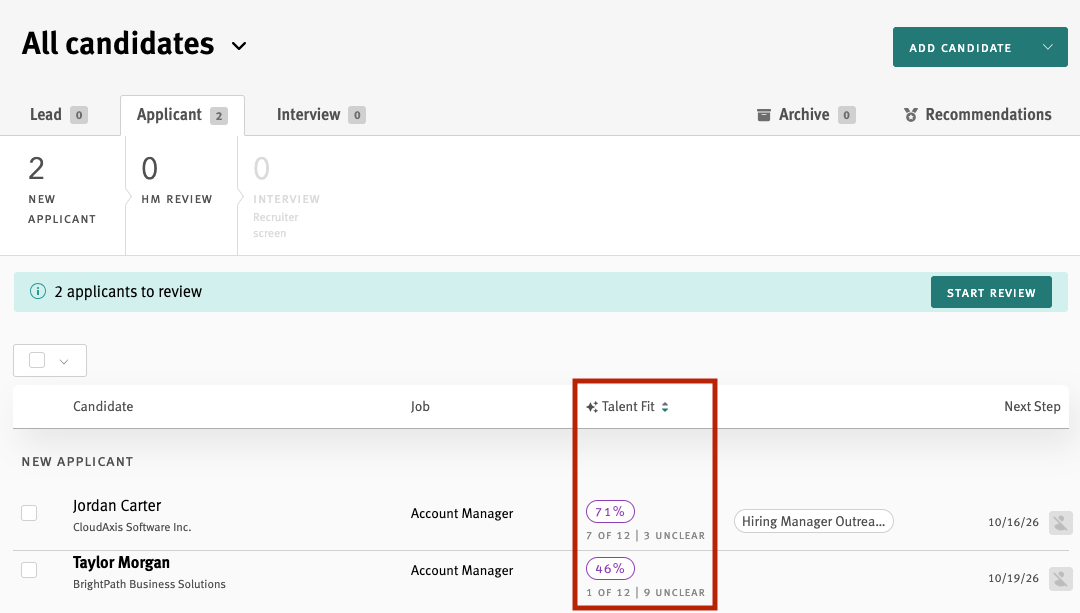
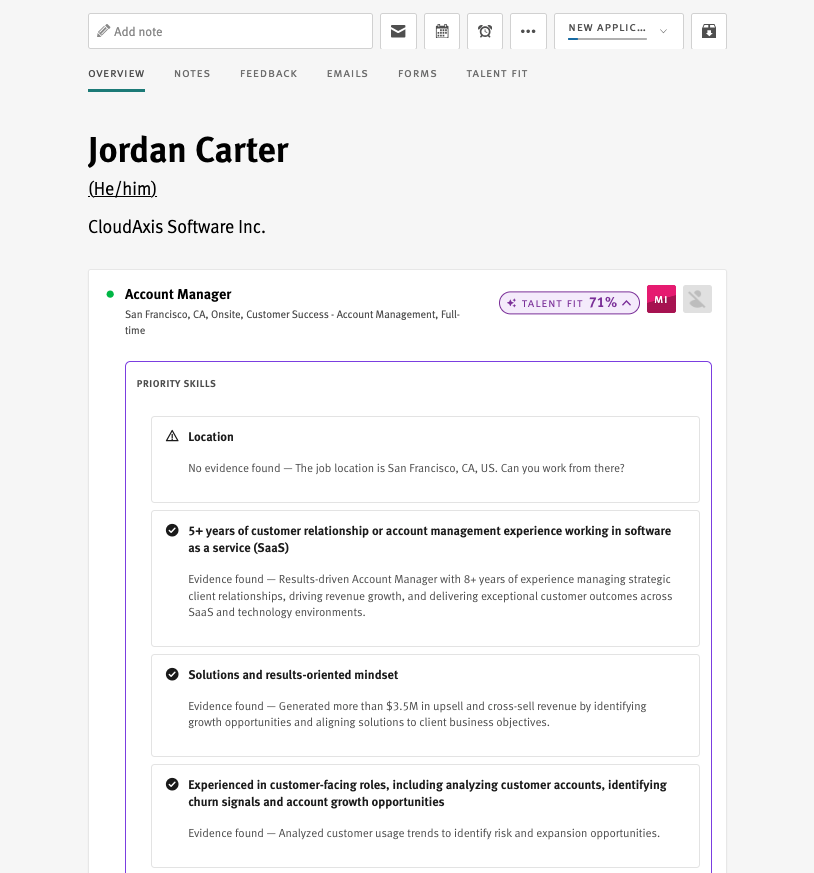
In Lever it's called Talent Fit. It reads the job description, turns it into a list of requirements, and gives each applicant a match score. Recruiters can sort the list by that score.
Three things are worth knowing:
- It ranks, but a person still decides. Lever's own AI page says "Recruiters always have the final say in decision-making," and its guide to AI screening says "AI should never make the final call on any hiring decisions." A low rank puts you further down the list, which is a real cost, but you're still in it.
- It reads for fit. These tools compare what you've done to what the role needs. Stuffing a resume with keywords you can't back up doesn't help, and recruiters can tell.
- There are rules now. New York City requires companies that use automated tools in hiring decisions to have them audited for bias and to tell candidates. If you're in NYC, you can ask.
Each score shows its work. For every requirement, Talent Fit quotes your resume as evidence, or says it found none. If you have the skill, make it easy to find.
The other kind of AI you might run into is fraud detection. Some systems now flag applications that look automated or fake, and I've been flagged myself. I wrote about why privacy choices can look like fraud.
Step 6: Application math (the real villain)
Let's put it all together. A thousand people apply. Some answer a knockout question wrong. A recruiter reads the rest, as many as time allows, and picks maybe ten matches for a first call. Three or four get to the final round, and one gets the offer. This is why applying early matters and why custom resumes will slow you down and make you less competitive.
Fit, math, and timing reject far more people than any robot. That's the brutal part: you can do everything right and still not get the job, because 99 other strong people applied too. It's also the hopeful part, because the math is something you can play.
If you got a quick rejection
It's almost always one of two things. Sometimes a recruiter really is at their desk, swiping through the queue, looking for specific experience, and in this market, if you don't have it, you're out fast. Or you answered a knockout question the "wrong" way: you said remote and the role is in the office, or you said four years of experience and they asked for five.
Neither one is a robot reading your resume.
Here's how you really "beat the ATS"
- Read the knockout questions twice. Most instant rejections live there.
- Keep one strong resume. A clear story about who you are and the impact you've had, good enough for most of the roles you want. Here's how I overhauled mine.
- Apply early. Day two beats day twelve.
- Apply where you fit. If you match 80% or more of the key requirements, your odds are real. If you match 40%, no rewrite will close that gap.
- Don't fall for resume scams. The famous "75% of resumes are rejected by the ATS" traces back to a 2012 press release from a company that no longer exists, and it never cited a source.
Your best defense is applying where you fit
You can't control how many people apply, or how busy the recruiter is, or whether a hiring manager changes their mind. You can control which roles you spend your energy on.
That's why I built Recruiter BFF. It compares job postings against your background and tells you if you're a match before you apply, so you can focus on the roles where you're a real match. When your Recruiter BFF says skip, you get that time back for a role where the math works in your favor. Recruiter BFF is free and runs in Claude or Codex, and there's a no-install kit for ChatGPT or any AI chat. A paid Claude or ChatGPT plan works best.

A human is reading your resume. Send it where it's worth reading.